FAQ
-
What is kro?
Kube Resource Orchestrator (kro) is a new operator for Kubernetes that simplifies the creation of complex Kubernetes resource configurations. kro lets you create and manage custom groups of Kubernetes resources by defining them as a ResourceGraphDefinition, the project's fundamental custom resource. ResourceGraphDefinition specifications define a set of resources and how they relate to each other functionally. Once defined, ResourceGraphDefinitions can be applied to a Kubernetes cluster where the kro controller is running. Once validated by kro, you can create instances of your ResourceGraphDefinition. kro translates your ResourceGraphDefinition instance and its parameters into specific Kubernetes resources and configurations which it then manages for you.
-
How does kro work?
kro is designed to use core Kubernetes primitives to make resource grouping, customization, and dependency management simpler. When a ResourceGraphDefinition is applied to the cluster, the kro controller verifies its specification, then dynamically creates a new CRD and registers it with the API server. kro then deploys a dedicated controller to respond to instance events on the CRD. This microcontroller is responsible for managing the lifecycle of resources defined in the ResourceGraphDefinition for each instance that is created.
-
How do I use kro?
First, you define your ResourceGraphDefinitions by creating ResourceGraphDefinition specifications. These specify one or more Kubernetes resources, and can include specific configuration for each resource.
For example, you can define a WebApp ResourceGraphDefinition that is composed of a Deployment, pre-configured to deploy your web server backend, and a Service configured to run on a specific port. You can just as easily create a more complex WebAppWithDB ResourceGraphDefinition by combining the existing WebApp resources with a Table custom resource to provision a cloud managed database instance for your web app to use.
Once you have defined a ResourceGraphDefinition, you can apply it to a Kubernetes cluster where the kro controller is running. kro will take care of the heavy lifting of creating CRDs and deploying dedicated controllers in order to manage instances of your new custom resource.
You are now ready to create instances of your new custom resource, and kro will respond by dynamically creating, configuring, and managing the underlying Kubernetes resources for you.
-
Why did you build this project?
We want to help streamline and simplify building with Kubernetes. Building with Kubernetes means dealing with resources that need to operate and work together, and orchestrating this can get complex and difficult at scale. With this project, we're taking a first step in reducing the complexity of resource dependency management and customization, paving the way for a simple and scalable way to create complex custom resources for Kubernetes.
-
What should I know about API changes?
kro's API is currently at
v1alpha1. As kro evolves, we may introduce breaking changes to improve the API. We are committed to providing clear migration paths, deprecation notices, and comprehensive support to help users adapt to any breaking changes. Our goal is to ensure smooth transitions as the project continues to improve. -
What is the difference between a Graph and a ResourceGraphDefinition?
A ResourceGraphDefinition creates a new Kubernetes API. You define a schema, kro generates a CRD, and users create instances of that CRD; each instance produces its own set of resources. A
Graphskips the API: it is a namespaced object whosenodesare the resources themselves, reconciled directly. Both use the same CEL expressions, dependency ordering,includeWhen,readyWhen, andforEach, and both run on the same engine.Use an RGD when the same composition is created many times with different inputs, or should be exposed as a Kubernetes API. Use a Graph to install a bundle of resources, react to existing resources, or aggregate many resources into one, without defining a new kind. The Graph API is alpha and disabled by default. See Composition in kro.
-
How do I use kro resources with ArgoCD?
To use kro resources with ArgoCD, you need to add a specific tracking annotation to all templated resources in your ResourceGraphDefinition.
The following code needs to be added to each templated resource:
metadata:
   ownerReferences:
      - apiVersion: kro.run/v1alpha1
        kind: ${schema.kind}
        name: ${schema.metadata.name}
        uid: ${schema.metadata.uid}
        blockOwnerDeletion: true
        controller: false
   annotations:
     argocd.argoproj.io/tracking-id: ${schema.metadata.?annotations["argocd.argoproj.io/tracking-id"]}
This annotation allows ArgoCD to properly track and manage the resources created by kro instances.
warningOwner references have limitations - see Owner References for details on risks and constraints.
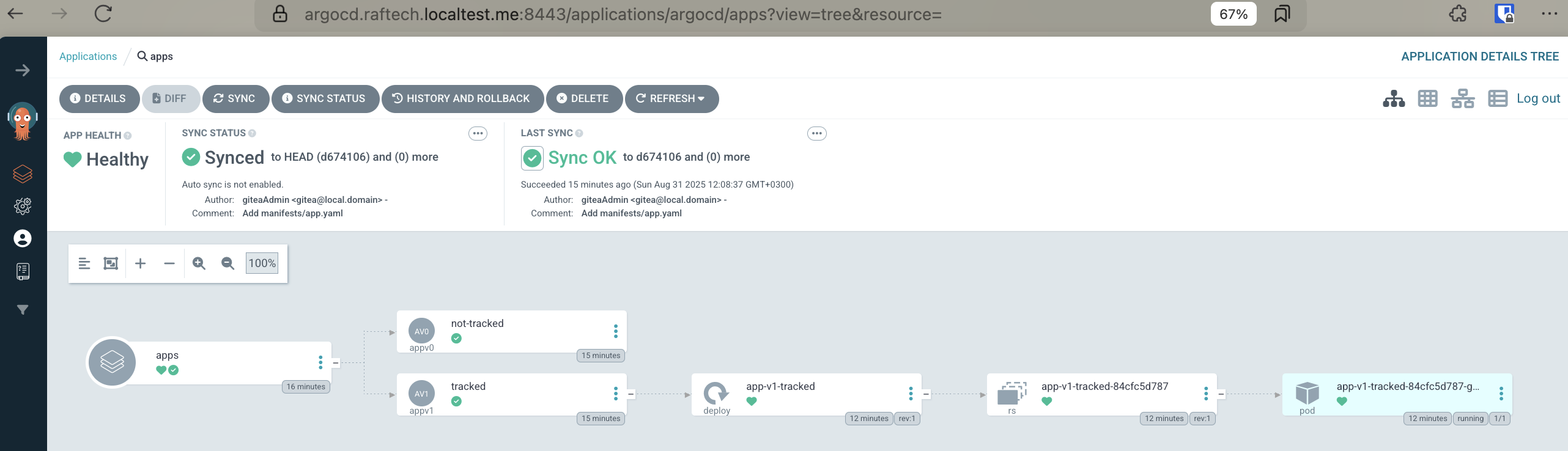
Note that the example shown above depicts ArgoCD's default resource tracking via annotations. You may choose to use
annotation+labelor justlabeland if so the example has to be modified to support your configuration. For more detailed information about ArgoCD resource tracking, please see the ArgoCD documentation.