Quick Start
Create your first ResourceGraphDefinition and deploy an application.
What is a ResourceGraphDefinition (RGD)?
A ResourceGraphDefinition (RGD) lets you create new Kubernetes APIs that deploy multiple
resources together as a single, reusable unit. In this example, we'll create an
RGD that packages a reusable set of resources, including a
Deployment, Service, and Ingress. These resources are available in any
Kubernetes cluster. Users can then call the API to deploy resources as a single
unit, ensuring they're always created together with the right configuration.
Under the hood, when you create an RGD, kro:
- Treats your resources as a Directed Acyclic Graph (DAG) to understand their dependencies
- Validates resource definitions and detects the correct deployment order
- Creates a new API (CRD) in your cluster
- Configures itself to watch and serve instances of this API
Prerequisites
Before you begin, make sure you have the following:
- kro installed and running in your Kubernetes cluster.
kubectlinstalled and configured to interact with your Kubernetes cluster.
apiVersion: rbac.authorization.k8s.io/v1
kind: ClusterRole
metadata:
  labels:
    rbac.kro.run/aggregate-to-controller: "true"
  name: kro:controller:my-application
rules:
  - apiGroups: ["kro.run"]
    resources: ["applications"]
    verbs: ["*"]
  - apiGroups: ["apps"]
    resources: ["deployments"]
    verbs: ["*"]
  - apiGroups: [""]
    resources: ["services"]
    verbs: ["*"]
  - apiGroups: ["networking.k8s.io"]
    resources: ["ingresses"]
    verbs: ["*"]
kubectl apply -f kro-quickstart-rbac.yaml
Create your Application RGD
Let's create an RGD that combines a Deployment, a Service and
Ingress. Save this as resourcegraphdefinition.yaml:
apiVersion: kro.run/v1alpha1
kind: ResourceGraphDefinition
metadata:
  name: my-application
spec:
  # kro uses this simple schema to create your CRD schema and apply it
  # The schema defines what users can provide when they instantiate the RGD (create an instance).
  schema:
    apiVersion: v1alpha1
    kind: Application
    spec:
      # Spec fields that users can provide.
      name: string
      image: string | default="nginx"
      replicas: integer | default=3
      ingress:
        enabled: boolean | default=false
    status:
      # Fields the controller will inject into instances status.
      deploymentConditions: ${deployment.status.conditions}
      availableReplicas: ${deployment.status.availableReplicas}

  # Define the resources this API will manage.
  resources:
    - id: deployment
      template:
        apiVersion: apps/v1
        kind: Deployment
        metadata:
          name: ${schema.spec.name} # Use the name provided by user
        spec:
          replicas: ${schema.spec.replicas} # Use the replicas provided by user
          selector:
            matchLabels:
              app: ${schema.spec.name}
          template:
            metadata:
              labels:
                app: ${schema.spec.name}
            spec:
              containers:
                - name: ${schema.spec.name}
                  image: ${schema.spec.image} # Use the image provided by user
                  ports:
                    - containerPort: 80

    - id: service
      template:
        apiVersion: v1
        kind: Service
        metadata:
          name: ${schema.spec.name}-svc
        spec:
          selector: ${deployment.spec.selector.matchLabels} # Use the deployment selector
          ports:
            - protocol: TCP
              port: 80
              targetPort: 80

    - id: ingress
      includeWhen:
        - ${schema.spec.ingress.enabled} # Only include if the user wants to create an Ingress
      template:
        apiVersion: networking.k8s.io/v1
        kind: Ingress
        metadata:
          name: ${schema.spec.name}-ingress
          annotations:
            kubernetes.io/ingress.class: alb
            alb.ingress.kubernetes.io/scheme: internet-facing
            alb.ingress.kubernetes.io/target-type: ip
            alb.ingress.kubernetes.io/healthcheck-path: /health
            alb.ingress.kubernetes.io/listen-ports: '[{"HTTP": 80}]'
            alb.ingress.kubernetes.io/target-group-attributes: stickiness.enabled=true,stickiness.lb_cookie.duration_seconds=60
        spec:
          rules:
            - http:
                paths:
                  - path: "/"
                    pathType: Prefix
                    backend:
                      service:
                        name: ${service.metadata.name} # Use the service name
                        port:
                          number: 80
Deploy the RGD
-
Create an RGD manifest file: Create a new file with the RGD definition. You can use the example above.
-
Apply the RGD: Use the
kubectlcommand to deploy the RGD to your Kubernetes cluster:kubectl apply -f resourcegraphdefinition.yaml -
Inspect the RGD: Check the status of the RGD using the
kubectlcommand:kubectl get rgd my-application -owideYou should see the RGD in the
Activestate, along with relevant information to help you understand your application:NAME APIVERSION KIND STATE READY TOPOLOGICALORDER AGEmy-application v1alpha1 Application Active True ["deployment","service","ingress"] 49
Create your Application Instance
Now that your RGD is created, kro has generated a new API
(Application) that orchestrates the creation of a Deployment, a Service, and
an Ingress. Let's use it!
-
Create an Application instance: Create a new file named
instance.yamlwith the following content:instance.yamlapiVersion: kro.run/v1alpha1kind: Applicationmetadata:name: my-app-instancespec:name: my-appreplicas: 1ingress:enabled: true -
Apply the Application instance: Use the
kubectlcommand to deploy the Application instance to your Kubernetes cluster:kubectl apply -f instance.yaml -
Inspect the Application instance: Check the status of the resources
kubectl get applicationsAfter a few seconds, you should see the Application instance in the
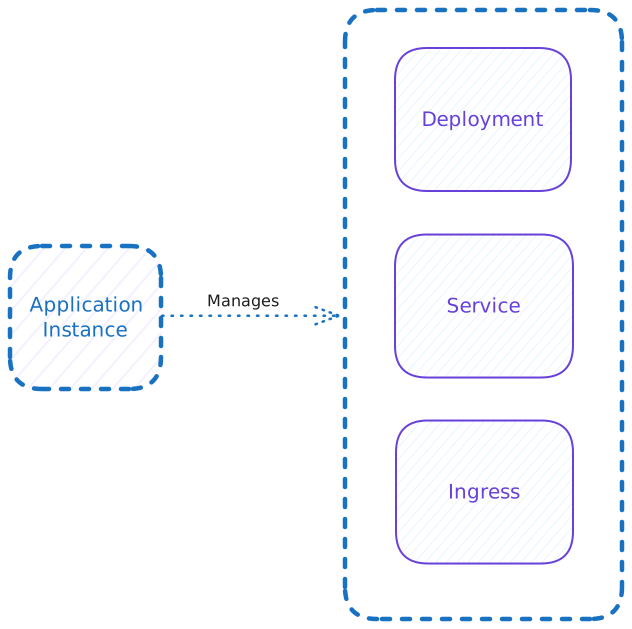
Activestate:NAME STATE READY AGEmy-app-instance Active True 10sWhen you create an instance, kro automatically creates and manages all the underlying resources:
-
Inspect the resources: Check the resources created by the Application instance:
kubectl get deployments,services,ingressesYou should see the
Deployment,Service, andIngresscreated by the Application instance. Note the deployment has 1 replica as specified:NAME READY UP-TO-DATE AVAILABLE AGEdeployment.apps/my-app 1/1 1 1 69sNAME TYPE CLUSTER-IP EXTERNAL-IP PORT(S) AGEservice/my-app-svc ClusterIP 10.100.167.72 <none> 80/TCP 65sNAME CLASS HOSTS ADDRESS PORTS AGEingress.networking.k8s.io/my-app-ingress <none> * 80 62s
Experiment with kro
kro continuously reconciles your resources. Try these experiments:
Change the replica count:
-
Edit
instance.yamlto increase replicas to 3:instance.yamlapiVersion: kro.run/v1alpha1kind: Applicationmetadata:name: my-app-instancespec:name: my-appreplicas: 3ingress:enabled: true -
Apply the change:
kubectl apply -f instance.yaml -
Watch the deployment scale up:
kubectl get deployment my-app
See kro's automatic reconciliation:
-
Delete the service:
kubectl delete service my-app-svc -
Watch kro recreate it automatically:
kubectl get service my-app-svc -wkro is watching and will instantly recreate the service to match your RGD definition.
Clean Up
kro can also help you clean up resources when you're done with them.
-
Delete the Application instance: Clean up the resources by deleting the Application instance:
kubectl delete application my-app-instanceNow, the resources created by the Application instance will be deleted.