Conditionals
Not all resources in a ResourceGraphDefinition need to be created for every instance. Sometimes you want to create resources conditionally based on user configuration - like enabling monitoring, backups, or TLS only when requested.
kro provides the includeWhen field to make resources optional. When you add includeWhen to a resource, kro evaluates the conditions during reconciliation and only includes the resource if all conditions are true.
Basic Example
Here's a simple example where an Ingress resource is only created if the user enables it in their instance spec:
resources:
  - id: ingress
    includeWhen:
      - ${schema.spec.ingress.enabled}
    template:
      apiVersion: networking.k8s.io/v1
      kind: Ingress
      metadata:
        name: ${schema.spec.name}
      # ... rest of ingress configuration
When a user creates an instance:
apiVersion: example.com/v1
kind: Application
metadata:
  name: my-app
spec:
  name: my-app
  ingress:
    enabled: true  # Ingress will be created
If ingress.enabled is false, the Ingress resource is skipped entirely. If the field may be omitted, give it a default or guard the expression so a missing field does not raise an evaluation error.
How includeWhen Works
includeWhen is a list of CEL expressions that control whether a resource is created:
- If all expressions evaluate to
true, the resource is included - If any expression evaluates to
false, the resource is skipped - Conditions are re-evaluated on later reconciliations; if a previously included resource starts evaluating to
false, kro prunes it - Each expression must evaluate to a boolean value (
trueorfalse) - For collections,
includeWhenapplies to the entire collection
What You Can Reference
includeWhen expressions can reference schema.spec fields and upstream
resources:
# ✓ Valid - references schema.spec and returns boolean
includeWhen:
  - ${schema.spec.ingress.enabled}
  - ${schema.spec.environment == "production"}
  - ${schema.spec.replicas > 3}
# ✓ Valid - references an upstream resource
includeWhen:
- ${deployment.status.availableReplicas > 0}# ✗ Invalid - must return boolean
includeWhen:
- ${schema.spec.appName} # returns string, not booleankro validates includeWhen expressions when you create the ResourceGraphDefinition, ensuring they reference valid fields and return boolean values.
When includeWhen references other resources, kro treats them as dependencies.
The condition is evaluated against the observed upstream state, and reconciliation
waits until the referenced resources have enough data to evaluate safely.
As that upstream state changes, the resource may become includable later or be
pruned later if the condition flips to false.
For example, this ServiceMonitor waits for the upstream deployment to
report available replicas before kro includes it:
resources:
  - id: deployment
    template:
      apiVersion: apps/v1
      kind: Deployment
      metadata:
        name: ${schema.spec.name}
      # ...

  - id: serviceMonitor
    includeWhen:
      - ${deployment.status.availableReplicas > 0}
    template:
      apiVersion: monitoring.coreos.com/v1
      kind: ServiceMonitor
      metadata:
        name: ${schema.spec.name}
      # ...
If deployment.status.availableReplicas is not populated yet, kro waits and
re-evaluates the condition on the next reconciliation instead of treating the
condition as false. If the deployment later scales back to zero available
replicas, kro prunes the ServiceMonitor.
includeWhen controls whether a resource exists at all. If the referenced
field is volatile (e.g. a .status field that fluctuates), the condition can
flip between true and false across reconciliations. Each flip creates or
deletes the resource — and all of its dependents — causing the graph to
flip-flop and producing unnecessary churn, wasted API calls, and
potentially broken workloads.
Before referencing an upstream resource in includeWhen, ask yourself: can
this field change back and forth during normal operation? If yes, you probably
want readyWhen on the upstream resource instead, which gates sequencing
without toggling existence.
# Risky — status fields are volatile; the resource may flip-flop
- id: monitor
  includeWhen:
    - ${deployment.status.availableReplicas > 0}

# Safe — user-controlled toggle, stable across reconciliations
- id: monitor
  includeWhen:
    - ${schema.spec.monitoring.enabled}
Referencing upstream resources is fine when the field is effectively
immutable after creation — for example, a ConfigMap data key that is set
once and never changes. Just be aware of the consequences if it does change.
Dependencies and Skipped Resources
When a resource is skipped (due to includeWhen conditions), all resources that depend on it are also skipped.
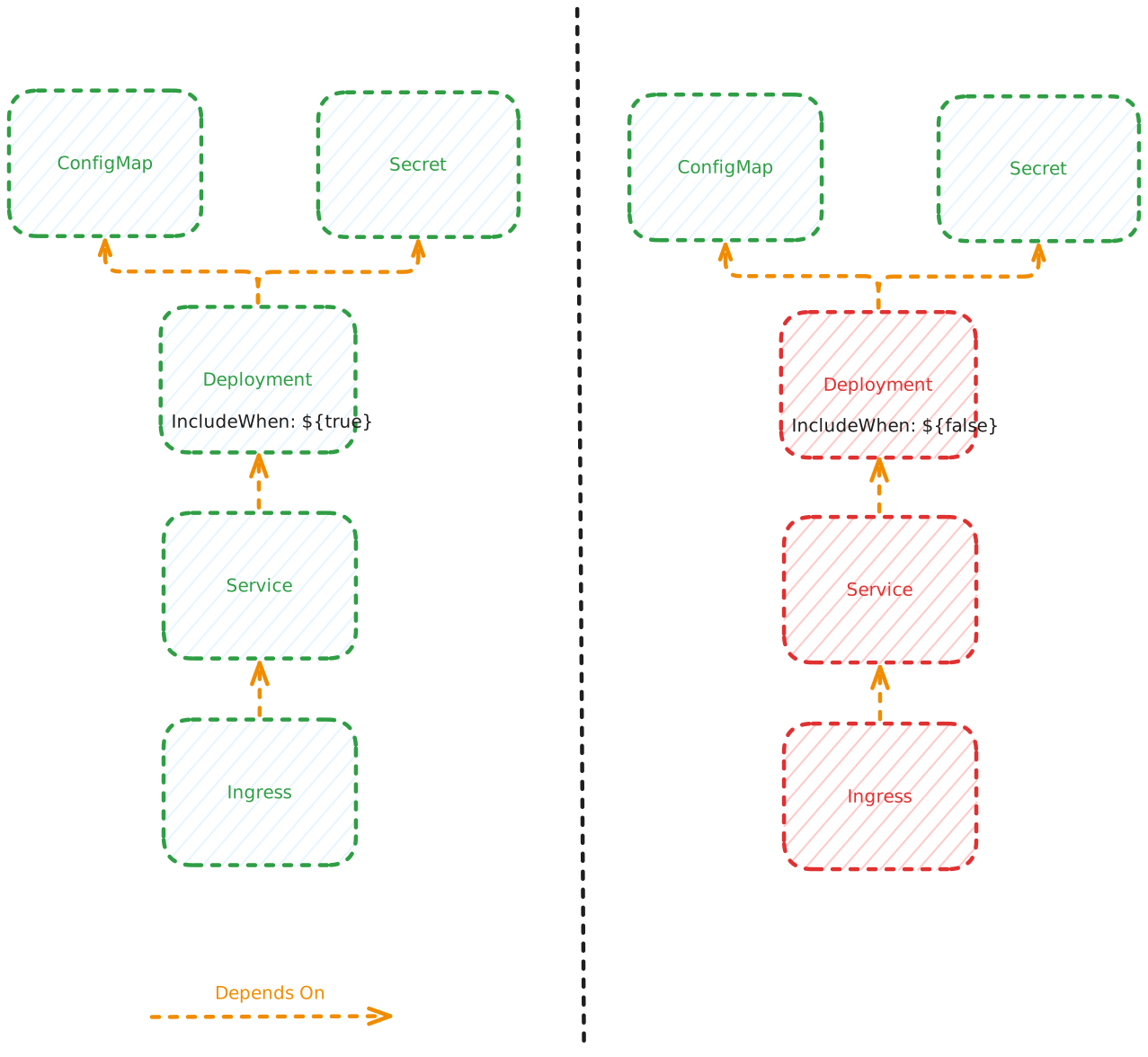
In this example, the Deployment on the left has an includeWhen condition that evaluates to true, so it's included along with all its children (Service and Ingress). The Deployment on the right (shown in red) has a condition that evaluates to false, so it and all its dependencies are skipped.
This ensures that the resource graph remains consistent and prevents resources from referencing other resources that don't exist.
Multiple Conditions
All conditions in includeWhen must be true (logical AND):
resources:
  - id: certificate
    includeWhen:
      - ${schema.spec.ingress.enabled}
      - ${schema.spec.ingress.tls}
    template:
      apiVersion: cert-manager.io/v1
      kind: Certificate
      # ... certificate config
The certificate is created only if:
ingress.enabledistrueANDingress.tlsistrue
For OR logic, combine in a single expression:
includeWhen:
  - ${schema.spec.env == "staging" || schema.spec.env == "production"}
Next Steps
- Readiness - Control when resources are considered ready
- Resource Basics - Learn about resource template structure