Overview
A ResourceGraphDefinition (RGD) lets you create a custom Kubernetes API that deploys multiple resources together as a single unit. You define the schema for your new API, the resources it should create, and how data flows between them using CEL expressions. If you want to compose resources without defining a new API, see Graphs.
When you apply an RGD, kro configures itself to serve your new API. It generates a CRD, registers it with the Kubernetes API server, and starts watching for instances. When users create instances of your API, kro creates the underlying resources in the correct order, wires values between them, and manages their full lifecycle.
How it Works
- You create an RGD defining a new API (like
Application) - kro generates a CRD for your API
- Users create instances of your API
- kro creates and manages all the underlying resources
Example
Here's an RGD that creates a new Application API. When users create an Application, kro automatically creates a Deployment:
apiVersion: kro.run/v1alpha1
kind: ResourceGraphDefinition
metadata:
  name: application
spec:
  schema:
    apiVersion: v1alpha1
    kind: Application
    spec:
      name: string
      image: string | default="nginx:latest"
      replicas: integer | default=3

  resources:
    - id: deployment
      template:
        apiVersion: apps/v1
        kind: Deployment
        metadata:
          name: ${schema.spec.name}
        spec:
          replicas: ${schema.spec.replicas}
          selector:
            matchLabels:
              app: ${schema.spec.name}
          template:
            metadata:
              labels:
                app: ${schema.spec.name}
            spec:
              containers:
                - name: app
                  image: ${schema.spec.image}
Users can now create applications:
apiVersion: kro.run/v1alpha1
kind: Application
metadata:
  name: my-app
spec:
  name: my-app
  image: nginx:1.27
  replicas: 5
kro will create and manage the Deployment automatically.
Anatomy of a ResourceGraphDefinition
An RGD has the standard Kubernetes resource structure:
apiVersion: kro.run/v1alpha1
kind: ResourceGraphDefinition
metadata: {}      # Standard Kubernetes metadata
spec:
  schema: {}      # Define your custom API
  resources: []   # Define Kubernetes resources to create
status:           # Managed by kro
  conditions: []
  state: ""
topologicalOrder: []metadata- Standard Kubernetes metadata (name, labels, annotations)spec.schema- Your custom API: what fields users can configure and what computed values to exposespec.resources- The Kubernetes resources to create and manage (Deployments, Services, etc.)status- Current state managed by kro: conditions, overall state, and computed creation order
For complete field documentation, see the RGD API Reference.
How kro Processes RGDs
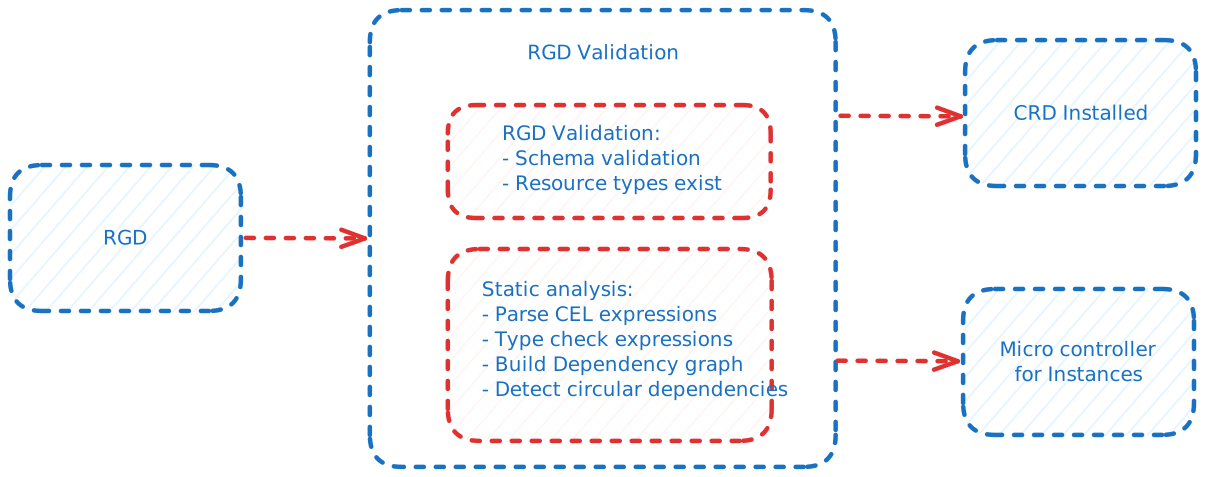
kro performs extensive static analysis to catch errors before deployment. Rather than discovering issues when users create instances, kro validates everything upfront when you create the RGD. Type errors, non-existent fields, missing CRDs, syntax issues, and circular dependencies are all caught during RGD creation, giving you immediate feedback.
Static Analysis and Validation
kro validates your RGD before any instances are created. When you create a ResourceGraphDefinition:
- Schema validation - Ensures your schema follows the SimpleSchema format
- CRD verification - Validates that all referenced resource types (Deployments, Services, etc.) exist in your cluster
- CEL type checking - Parses and validates all CEL expressions, checking that:
- Referenced fields exist in the actual resource schemas
- Expression output types match their target field types
- All expressions are syntactically correct
- Dependency inference - Automatically analyzes CEL expressions to infer resource dependencies and compute the creation order
This validation happens at RGD creation time, catching errors early before any user creates an instance. For a deep dive into how this works, see Static Analysis.
Automatic Dependency Management
kro analyzes your CEL expressions to automatically infer dependencies between resources. For example, if a Service references ${deployment.metadata.name}, kro knows the Deployment must be created first. This dependency graph is used to:
- Compute creation order - Resources are created in topological order
- Compute deletion order - Resources are deleted in reverse topological order
- Detect circular dependencies - kro rejects RGDs with circular dependencies
- Show the order - The computed order appears in
status.topologicalOrder
See Dependencies & Ordering for details on how this works.
Generated CRDs and Controllers
When your RGD is validated and accepted:
- CRD generation - kro generates a CustomResourceDefinition for your API and registers it with the Kubernetes API server
- Dynamic controller - kro configures itself to watch for instances of your new API
- Lifecycle management - The controller creates resources in dependency order, evaluates CEL expressions, manages status updates, and handles deletion
RGD Status Conditions
kro reports the RGD's state through five conditions in status.conditions:
| Condition | Description |
|---|---|
| Ready | Aggregate condition. True only when GraphRevisionsResolved, GraphAccepted, KindReady, and ControllerReady are all True. |
| GraphRevisionsResolved | Whether graph revisions are settled and the latest revision is compiled and active. It may be Unknown while kro is still waiting. |
| GraphAccepted | Whether kro accepted the current graph for the latest revision path. False means the graph was rejected or the latest revision failed. |
| KindReady | Whether the generated CRD has been created and accepted by the Kubernetes API server. |
| ControllerReady | Whether kro successfully registered the dynamic controller for the generated kind. |
status.state reflects whether kro is serving an accepted graph for the API:
ActivewhenGraphAccepted=True,KindReady=True, andControllerReady=TrueInactiveotherwise
You can check the status with:
kubectl get rgd <name> -o yaml
For complete status field documentation, see the RGD API Reference.
Annotations
kro supports the following annotations on ResourceGraphDefinitions:
| Annotation | Description |
|---|---|
kro.run/allow-breaking-changes | When set to "true", allows RGD updates that would normally be blocked due to breaking changes. Use with caution. |
Breaking Changes
kro detects breaking changes when you update an RGD and blocks them by default to protect existing instances. If you need to force a breaking change, add the annotation:
apiVersion: kro.run/v1alpha1
kind: ResourceGraphDefinition
metadata:
  name: my-rgd
  annotations:
    kro.run/allow-breaking-changes: "true"
spec:
  # ...
Currently, kro only detects breaking changes in the schema section of an RGD:
- Field removal
- Type changes
- New required fields without defaults
- Enum restrictions
- Pattern changes
Additional opt-in checks cover more schema facets and conservatively reject changes kro cannot yet classify. See Feature Gates for the available policy and rollout guidance.
Breaking changes can invalidate existing instances. Ensure you understand the impact before using this annotation.
What RGDs Provide
- Type safety: All CEL expressions are validated when you create the RGD
- Dependency management: kro automatically determines the order to create resources
- Validation: Users get immediate feedback if they provide invalid values
- Reusability: Define once, use many times across teams
Graph Revisions
Every time you change an RGD's spec, kro creates an immutable snapshot called a GraphRevision rather than compiling the spec inline. This separates validation from compilation and gives you a visible history of every spec change.
The RGD controller hashes the new spec, deduplicates against the latest revision, and creates a new GraphRevision object if the spec actually changed. A separate GraphRevision controller then compiles the snapshot independently and writes the result into an in-memory registry that instance controllers read from.
You can list revisions with kubectl get gr:
NAME              REVISION   READY   AGE
my-webapp-r00001  1          True    2d
my-webapp-r00002  2          True    1d
my-webapp-r00003  3          True    5m
If the latest revision fails compilation, instances stop progressing until you push a valid spec - there is no automatic fallback to an older revision.
For the full details on naming, lifecycle, retention, and debugging, see Graph Revisions.
Next Steps
Explore the details of ResourceGraphDefinitions:
- Schema - Define your custom API structure
- Resource Basics - Define resources with CEL expressions
- Conditional Creation - Create resources conditionally with
includeWhen - Readiness - Control when resources are considered ready
- Collections - Create multiple resources with
forEach - External References - Reference resources outside your RGD
- CEL Expressions - Reference data between resources
- Dependencies & Ordering - How kro infers dependencies and determines creation order
- Static Type Checking - How kro validates RGDs before instances are created
- Graph Revisions - How kro snapshots and compiles RGD spec changes
- Instances - Creating and managing instances of the generated API